How To Change Default Search Engine In Firefox

VN:F [1.9.17_1161]
Rating: 5.0/5 (3 votes cast)
14 Comments 5,645 views

I recently upgraded Firefox to version 4 and out of no where Yahoo becomes the default. No clue why. It always used to be the Google as default search engine.

Hang on what is the default search engine in Firefox browser?

When you type any search query in the address bar and hit enter you will see Firefox shows search result from Yahoo/Google/Bing depending on the default search engine set in your Firefox browser.

I was thinking that there might be a simple setting somewhere which will allow to change the default search engine but to my surprise it is not so simple.

I had to do a little bit of search to find out how to change default search engine in Firefox browser.

Here is how you do it.

Open Firefox browser and type following in the address bar

about:config

Changing default search engine in Firefox - Step 1

Changing default search engine in Firefox - Step 1

It will prompt for with a message, accept the danger and more on.

Next you will see a lit of parameters. In the top Filter enter following and hit Enter

browser.search.defaultenginename
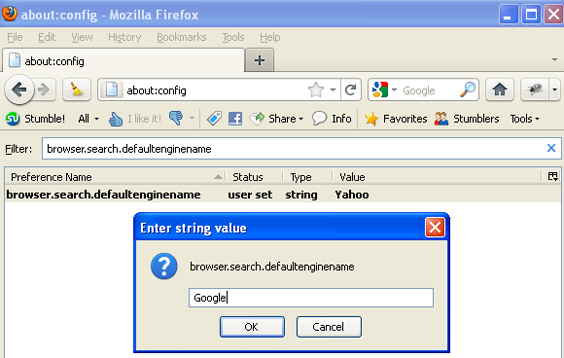
Changing default search engine in Firefox - Step 2

Changing default search engine in Firefox - Step 2

Here you will see the default search engine value. You can set the search engine which you want to use.  Google, Yahoo, Bing  or you can enter any other search engine.

Restart Firefox browser.

Enter any search query in the address bar and see which default search engine it pickup.

All done!!

NO!

It didn’t work for me. In fact the default search engine set in my Firefox browser was Google. However whenever I entered search query in the address bar it picks up any random search engine from Google/Yahoo/Bing.

This is weired.  I thought this would fix the default search engine but it didn’t. May be this setting doesn’t work in Firefox 4?

Or it is some other setting which is overriding the Firefox browser setting?

My next guess was that may be some Add-ons or plugins are causing Firefox to switch the search engine randomly.

So to check what is going on I typed a query string and while hitting fixed my eyes on status bar to see what it shows. When I hit enter it quickly showed ..Conduit … Viola! I found the problem. This is the Conduit search which has hijacked the default search engine. I knew conduit from the past as it was installed as part of some Firefox Add-on.

Next step is to get rid of this nasty Conduit search from Firefox.

How to remove Conduit search engine from Firefox browser

I did more research to find out how to remove Conduit search engine from Firefox browser and found many solution. Instead of wasting time in trying them I opted for the quickest solution which is to reset the Conduit search parameters in Firefox configuration.

To do so type following in the address bar again

about:config

then filter for followings

search.conduit

It will show all the related parameters. Right click on them one by one and reset.
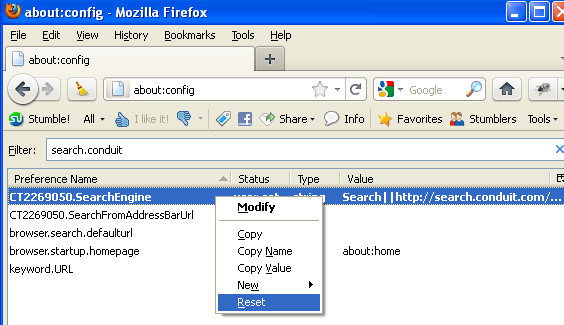
Resetting Conduit Search Engine Parameters In Firefox Browser

Resetting Conduit Search Engine Parameters In Firefox Browser

Restart Firefox browser and you type search query in address bar and you will see Conduit is no more randomizing your default search engine.

How To Change Default Search Engine In Firefox , 5.0 out of 5 based on 3 ratings

Similar Posts

14 Responses to “How To Change Default Search Engine In Firefox”

  1. Zarah 30. Jun, 2011 at 12:14 pm #

    you are absolutley amazing, that conduit toolbar was really getting on my nerves, thank you :D

    [Reply]

    VA:F [1.9.17_1161]
    Rating: 0 (from 0 votes)
  2. jeff arnold 30. Jun, 2011 at 4:44 pm #

    Thanks for this great tutorial. I was highly irritated that I kept getting Bing results when I wanted Google. I had to adjust two files, though — one was the search.conduit file and the other was the keyword.url file — both were set with ‘conduit’ verbiage/urls.

    Again — thanks.

    [Reply]

    VA:F [1.9.17_1161]
    Rating: 0 (from 0 votes)
  3. ismadi 12. Aug, 2011 at 7:19 am #

    thanks ;)

    [Reply]

    VA:F [1.9.17_1161]
    Rating: 0 (from 0 votes)
  4. Soundar 05. Sep, 2011 at 5:37 pm #

    I really appreciate you to find a such great solution for the search engine problem.
    Thanks Thanks Thanks Thanks Thanks

    [Reply]

    VA:F [1.9.17_1161]
    Rating: 0 (from 0 votes)
  5. Tennille Blackmore 14. Sep, 2011 at 1:47 pm #

    OMG!!!! You just helped me exorcise conduit! Thank you thank you thank you thank you thank you! you have NO idea how much this has been driving me, and now the last trace of the blasted thing is finally gone.
    <3 <3 <3

    [Reply]

    VA:F [1.9.17_1161]
    Rating: 0 (from 0 votes)
  6. Rona 21. Sep, 2011 at 10:00 pm #

    thank you so much – iwas going crazy trying to find the change
    now i will fix the other 3 PC

    [Reply]

    VA:F [1.9.17_1161]
    Rating: 0 (from 0 votes)
  7. KitKat 29. Oct, 2011 at 9:37 pm #

    I have spent a maddening amount of hours trying to resolve this. I cannot thank you enough. May you be blessed coming and going.
    I thought I was going to lose my mind!!

    [Reply]

    VA:F [1.9.17_1161]
    Rating: 0 (from 0 votes)
  8. h 05. Nov, 2011 at 6:53 pm #

    thank you so much!

    [Reply]

    VA:F [1.9.17_1161]
    Rating: 0 (from 0 votes)
  9. DJ 30. Nov, 2011 at 4:09 pm #

    Dude it’s not working in Aurora….

    [Reply]

    VA:F [1.9.17_1161]
    Rating: +1 (from 1 vote)
  10. thanks 10. Jan, 2012 at 2:06 am #

    thanks man owe ya one

    [Reply]

    VA:F [1.9.17_1161]
    Rating: 0 (from 0 votes)
  11. DB 12. Jan, 2012 at 4:30 pm #

    thank you. Owe ya one.

    [Reply]

    VA:F [1.9.17_1161]
    Rating: 0 (from 0 votes)
  12. Nikhil 19. Jan, 2012 at 11:01 am #

    Thank you!

    [Reply]

    VA:F [1.9.17_1161]
    Rating: 0 (from 0 votes)
  13. UMESH 28. Feb, 2012 at 8:49 am #

    Thanks man.. was really helpful

    [Reply]

    VA:F [1.9.17_1161]
    Rating: 0 (from 0 votes)
  14. Alex 06. Apr, 2012 at 11:00 am #

    I looked up (Even copied and pasted search.conduit) into the bar and it doesn’t show it yet I am still being redirected to yahoo every time.

    [Reply]

    VA:F [1.9.17_1161]
    Rating: 0 (from 0 votes)

Leave a Reply

Notify me of followup comments via e-mail. You can also subscribe without commenting.