There is a tutorial on Google which explains How do I manually track clicks on outbound links?
However that tutorial doesn’t help a lot for non-geeks.
This is my effort to simply the outbound link tracking.
Assuming that you are using Asynchronous Google Analytics Tracking Code follow these steps
Step 1
Add following code just before closing head </head>
[javascript]<script type="text/javascript">
function recordOutboundLink(link, category, action) {
_gat._getTrackerByName()._trackEvent(category, action);
setTimeout(‘document.location = "’ + link.href + ‘"’, 100);
}
</script>
[/javascript]
Step 2
For each external/outbound link which you want to track add the tracking information
[javascript]<a onclick="recordOutboundLink(this, ‘External Website’, ‘externalwebsite.com’);return false;" href="http://www.externalwebsite.com">[/javascript]
Google Analytics Report
You can find this outbound link tracking report under Google Analytics Content->Even Tracking
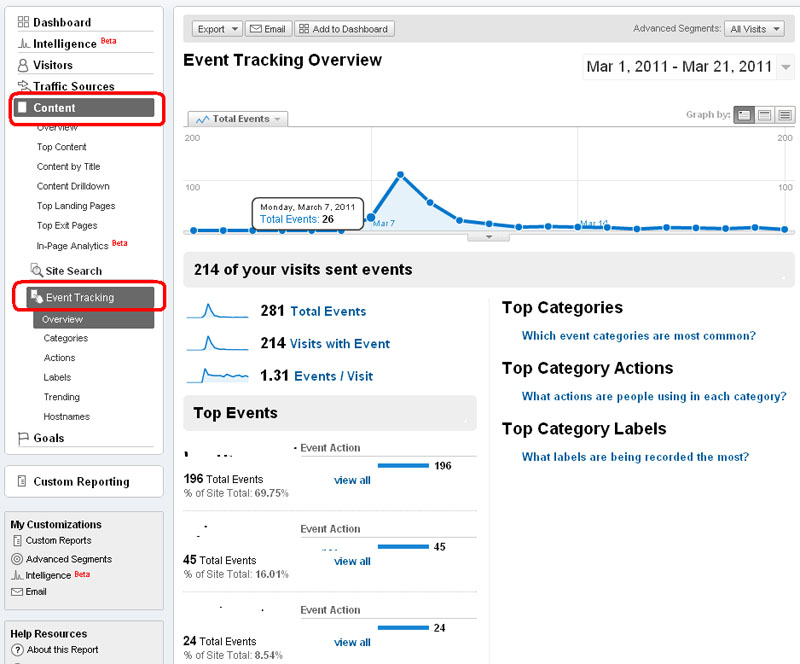
You can see more details on this report from the menus in left.


Leave a Reply